Build a B2B SaaS on Azure with Director-Driven Development
A step-by-step guide to SaaSAllTheThings: build a multi-tenant B2B SaaS on Azure with an AI coding agent, where you own the product, the framework owns the architecture, and the build verifies every change.
SaaSAllTheThings turns an idea, a proof of concept or an existing app into a multi-tenant B2B SaaS on Azure, with an AI coding agent doing the building and you directing it. It is free, MIT licensed and runs locally in your app’s own git repository.
In my Director-Driven Development post I described a way of working where you stop writing the implementation and become the director. SaaSAllTheThings is that way of working applied to the hardest kind of product I know: software that many business customers share, sign in to with their own identity provider, and trust with their data.
The framework splits the work three ways:
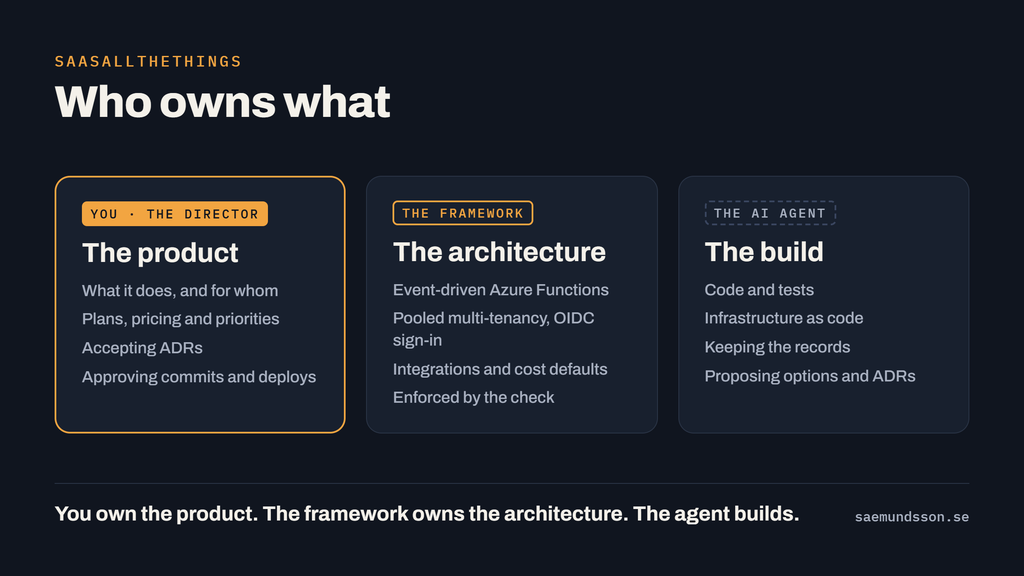
The middle column is the unusual part. The architecture isn’t up for debate in every session, because the check enforces it, so your attention goes to the product.
This guide walks through it step by step, from an empty repo to a running, released stage. The commands are Claude Code slash commands; every one of them also works as a plain sentence (“do the next task”), and the core works with any assistant that reads AGENTS.md.
Step 1: Pick your starting point and install
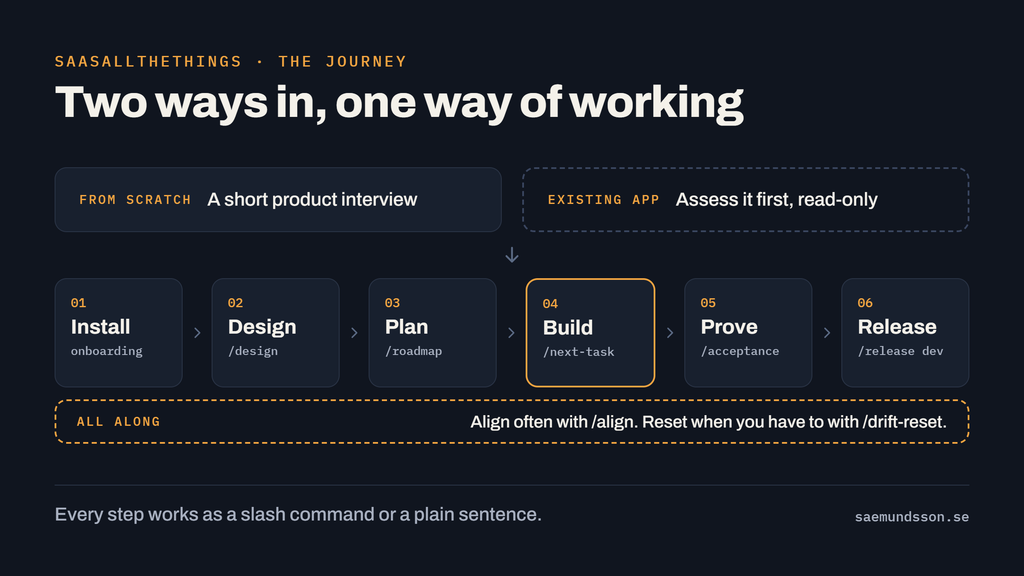
There are two ways in, and they meet at the same place.
- From scratch. A short product interview, then the platform is built in small, proven steps, starting with tenancy and sign-in rather than bolting them on later.
- From a proof of concept or an existing app. Assess it first. The
saas-assessmentskill reads the app without changing it and writes a report: how ready it is (scored, with evidence), a roadmap by stage with rough effort, the decisions to make, and the workshops to hold. Ask it “what does it take to make this app a SaaS?”
Your app needs git with no uncommitted changes, bash (Git for Windows includes it) and your backend’s toolchain, the .NET SDK 8+ for the default stack. Then, in Claude Code:
/plugin marketplace add Freakling/SaaSAllTheThings
/plugin install saasallthethings@saasallthethings
Open a new session in your app’s folder and run /saasallthethings:saas-all-the-things. Onboarding works out whether this is a new app, an existing one or an upgrade, and then:
- installs the files into your repo;
- settles the backend stack with you, keeping yours if it’s compatible;
- interviews you about the product, or reads the existing app, including its single-tenant habits and secrets;
- writes the first stages of the roadmap into
TASKS.md; - ends with one commit for you to approve.
Restart Claude Code so the new commands load. Using another assistant? Onboarding installs the tool-neutral core only, and your assistant follows AGENTS.md.
Step 2: Describe the product, one decision at a time
The product is yours, so the agent never decides a business rule on its own. Start a design session on any capability:
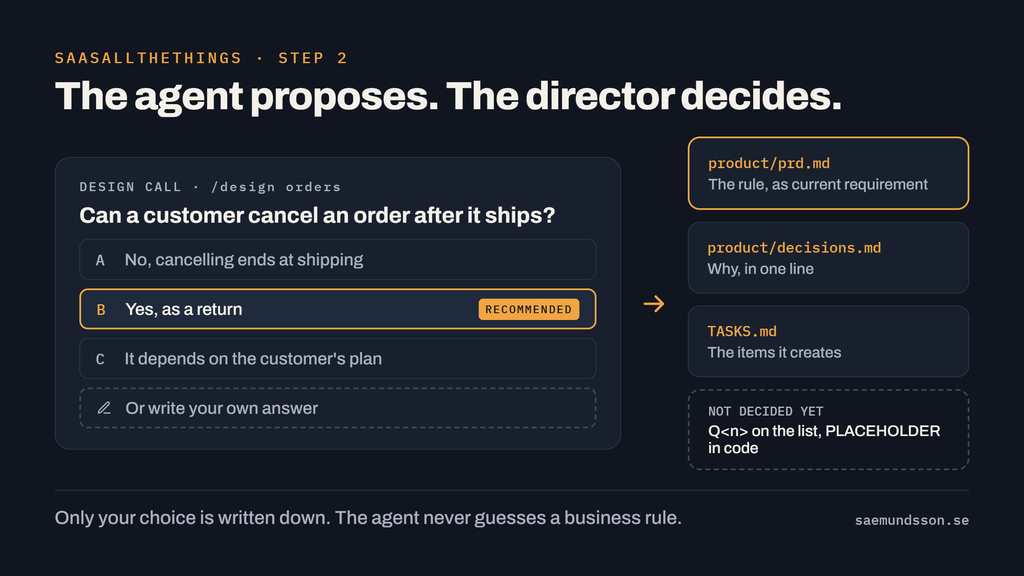
/design ordersEvery product question comes back to you as 2-4 options with a recommendation, and you can always write your own answer. The agent proposes. The director decides. Your choices land in three plain files:
product/prd.md: the product’s current requirements, plus its open questions;product/decisions.md: why, one line per decision;TASKS.md: the items the decision creates.
Anything not decided yet goes on the open-questions list as Q<n>, and values you haven’t set are marked PLACEHOLDER in the code. /design questions ranks the open questions by what they unblock, so you know which decision to make next.
You don’t need a terminal for this part. The saas-design-session skill runs the same sessions in the Claude apps, on desktop, web or mobile, and it also prepares and scribes workshops with customers: agenda, pre-reads, timekeeping and decisions. Drop the notes into assessment/workshops/ and “process the workshop notes” turns them into records.
When a design session’s commit lands, clear the conversation. Every decision is in the files, so the next session loses nothing.
Step 3: Let the framework own the architecture
You don’t design the architecture from scratch each time. SaaSAllTheThings ships a reference architecture in .satt/reference/, one topic per file, and the agent reads only the topics an item touches:
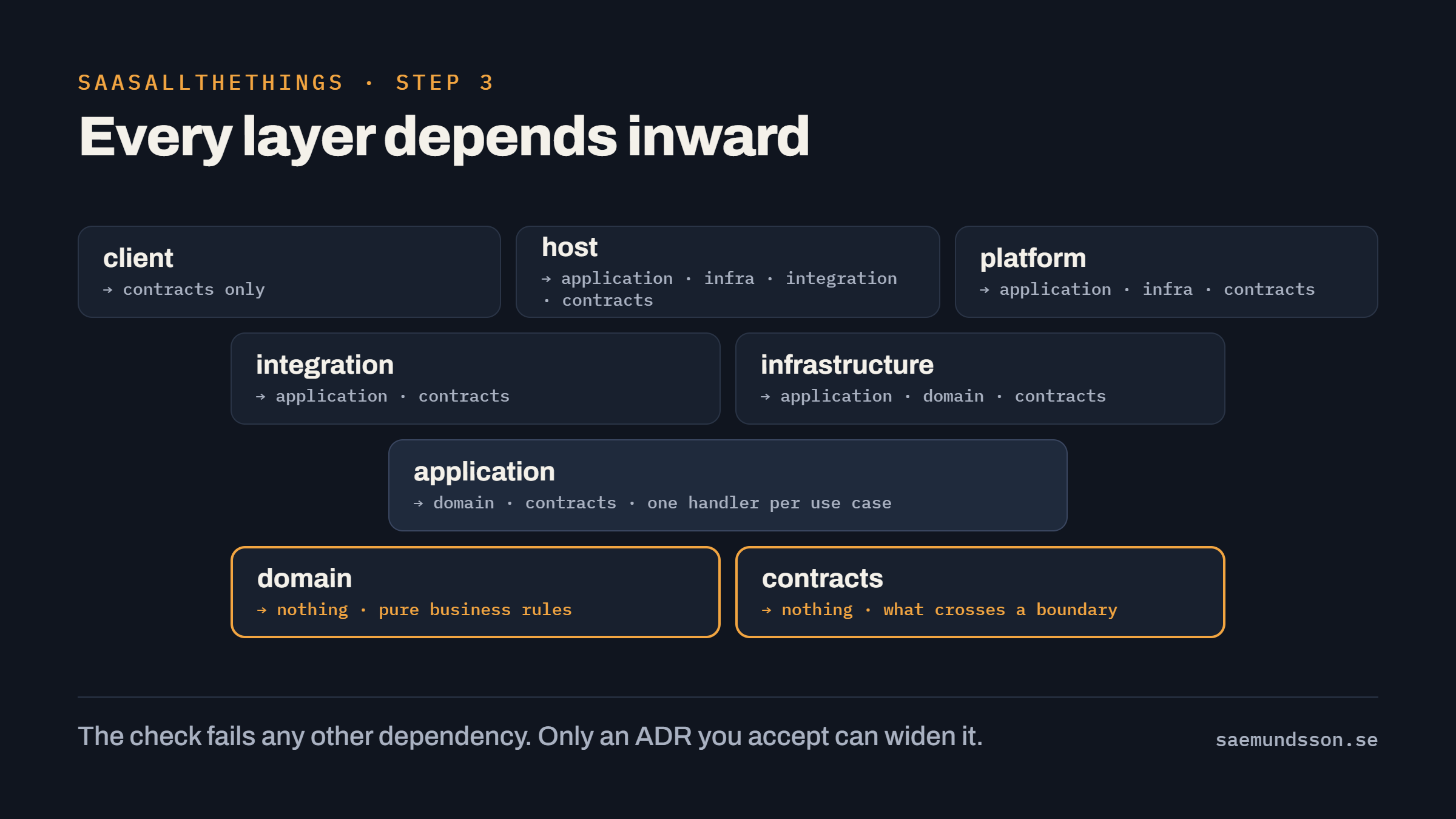
- Layers: contracts, domain, application, infrastructure, integration, host, platform and client, each allowed to depend only on the layers the reference lists. The domain is pure; the Azure Functions hosts stay thin.
- Event-driven: commands on queues, events on topics (Service Bus), state and its events saved together through an outbox, idempotent consumers, versioned contracts.
- Clients: a Windows app and a mobile app, separate and thin, depending on the contracts only.
- Cost: Flex Consumption Functions, serverless Cosmos DB, one Service Bus namespace, log caps and a budget per environment.
When a build can’t comply, it stops and asks. You change the architecture for one app through an architecture session:
/architectIt writes an architecture decision record in adr/. Option one is always “comply with the reference”, so a deviation has to earn its place, with its cost in effort and monthly Azure spend. An ADR stays proposed until you accept it; in Claude Code a hook asks you before any ADR is marked accepted. If the deviation would fail the check, the ADR names it in a line like this:
- Exception: <rule> <path pattern>The check excuses a violation only while an accepted ADR names it. Deviation becomes a decision, not an accident.
Step 4: Get tenancy, identity and integrations right first
The parts that make SaaS hard are the parts most often bolted on last. SaaSAllTheThings builds them first and checks them by machine.
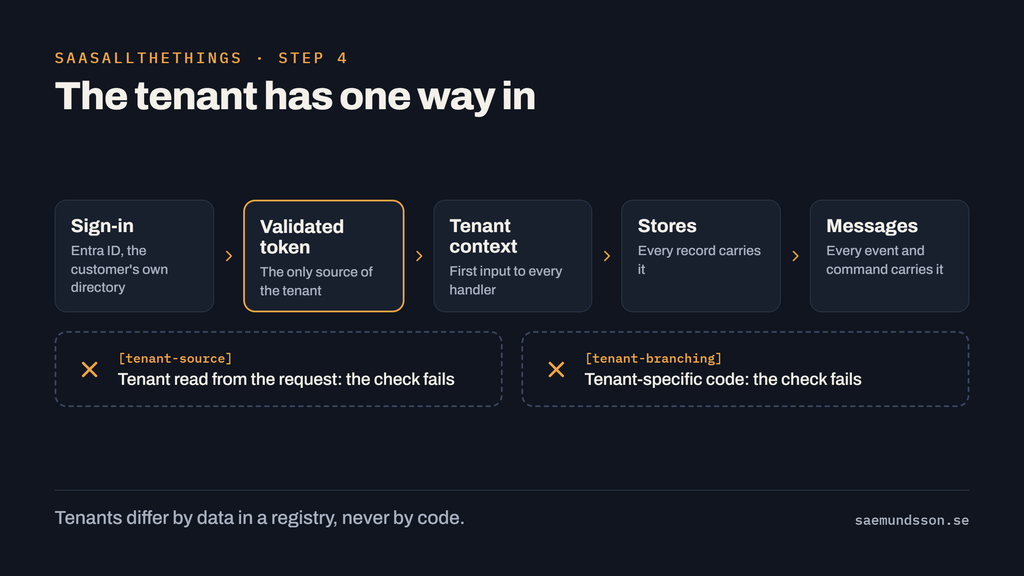
- Tenancy is pooled. The tenant comes from the validated token, never from the request. Every record and message carries it. Tenants differ by data in a registry, never by code, and a tenant can move to its own deployment later.
- Identity is OIDC with Entra ID, multi-tenant, so customers sign in with their own directory (External ID for those without one). Clients use auth code with PKCE. Managed identities and federated credentials everywhere: no secrets in code, config or apps.
- Integrations get a contract you decide: direction, system of record and conflict handling, then one anti-corruption layer and function app per external system.
/integrate navisionstarts with Navision (Dynamics NAV / Business Central). - Data rules are product decisions. Residency, retention, which fields are personal, audit needs, and export and deletion when a customer leaves all live in the PRD’s Data and Compliance section, and stay open questions until you decide them. Personal data
This is what the check does when someone, human or agent, reads the tenant from a request header. Real output from the framework’s example app:
check: architecture violations (only an accepted ADR in adr/ excuses one; see .satt/procedures/architect.md):
  [tenant-source] src/OrderDesk.Functions/Orders/PlaceOrderFunction.cs:30: the tenant comes from the validated token, never from the request
check: architecture: FAIL: 1 violations
A second rule, tenant-branching, fails tenant-specific ifs in the code. In Claude Code, a hook also blocks reading Key Vault secrets and creating client secrets.
When your first customer is ready, /tenant runs a readiness check (isolation tests on every store, no tenant-specific code, a decided plan, identity, integrations) and writes out the steps only you can take: the registry entry, the consent link for the customer’s admin, role assignments and a smoke test. Onboarding a tenant changes no code.
Step 5: Plan one stage at a time
Every SaaSAllTheThings project goes through the same stages, so any session knows where the project stands. Existing apps start with stage 0, new ones at stage 1, and stages 4-6 can run side by side once the first slice works.
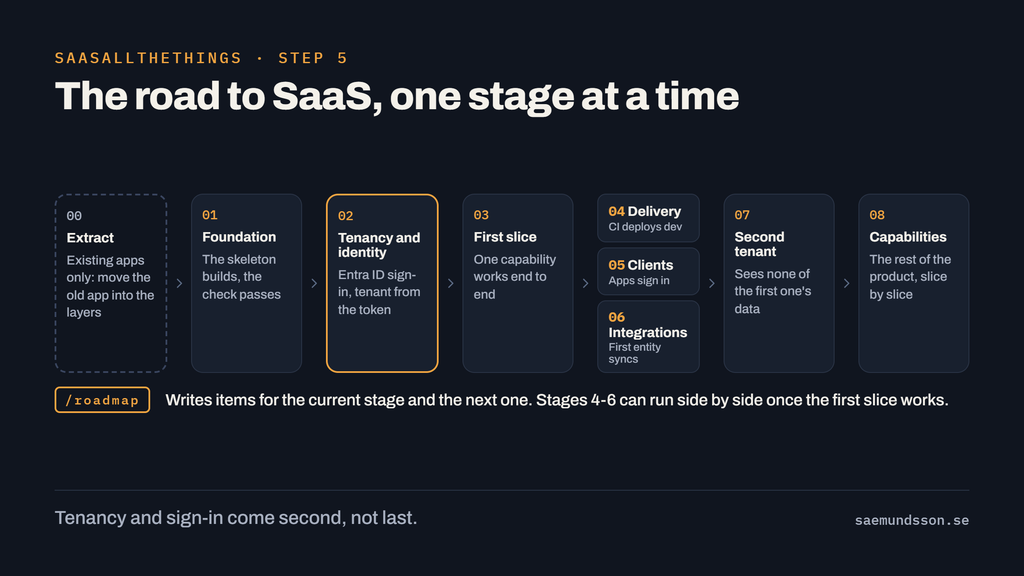
/roadmap writes items for the current stage and the next one only. Later stages wait, so they can be planned with what the earlier ones teach. Each item is small, sized and explicit about its scope:
### T12 · Place an order through the API · todo · M · agent
- Depends on: T10
- Touches: src/OrderDesk.Application/Orders/PlaceOrderHandler.cs (new), …
- Done when: an order without lines is rejected (test) · OrderPlacedV1 is saved with the order (test) · POST /api/v1/orders answers 201 in dev (demo)
- PRD: Capabilities › Orders
Touches names every file the item may change. Done when lists one to three observable outcomes, each tagged with how it’s proven. Large items are split before they start: contract first, then domain and application, then the host, then the client. Things only you can do, like app registrations or customer conversations, become human items in the same queue.
Step 6: Direct the build loop
Now the agent builds. One command picks the next ready item, high-severity bugs first:
/next-taskOr say “work through the queue”, and it keeps going until an item needs you. Each item runs the same loop:
- Hand off. The main session claims the item and hands it to a
buildersubagent that starts with an empty context. The builder reads only what the item needs: the files inTouches, the relevant architecture rows, the PRD sections it names and the reference topics it touches. - Build on the right model. Each size maps to its own model: Haiku for XS and S, Sonnet for M, Opus for L and XL. A failed build retries once on the next size up.
- Prove. The builder runs
bash tools/check.sh: the architecture rules, then the stack’s build and tests, then the Bicep files, then any app-specific checks. “It compiled” is not an answer. - Review what’s risky. L and XL items, and M items that touch a contract, tenant isolation, identity or a stored schema, get an independent
reviewersubagent in its own fresh context before the commit. Findings in scope are rebuilt; anything outside the item becomes a new item. - Commit. You approve it. One item, one commit.
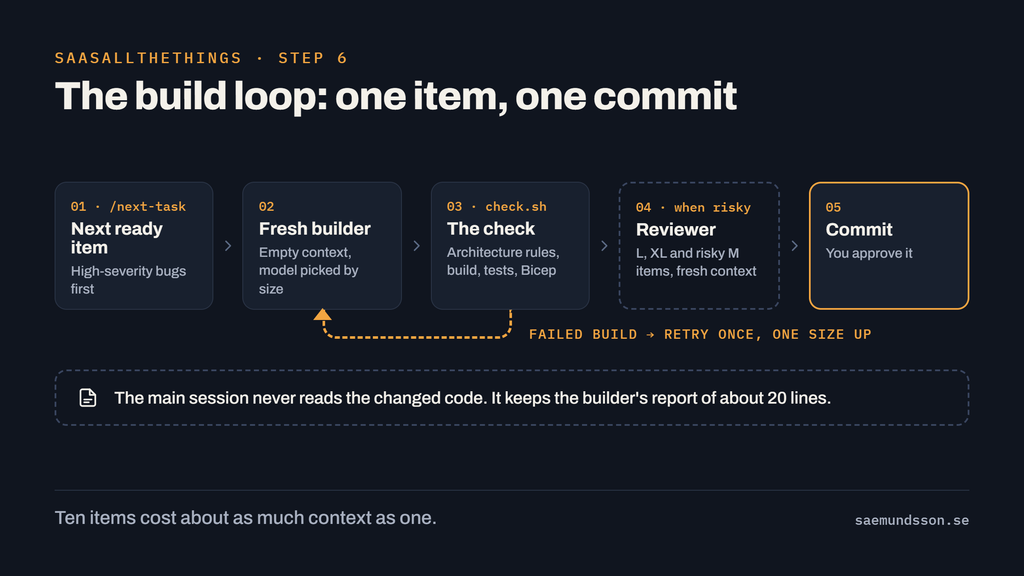
The main session never reads the code being changed. After each item it keeps only the builder’s report of about 20 lines, so a session that works through ten items stays about as lean as one that did one. When a session ends, nothing is lost: TASKS.md, the commits, the PRD and the ADRs hold everything.
The check also runs in a git pre-commit hook, and in Claude Code before the agent ends its turn. A force push, reset --hard, --no-verify and deleting Azure resources are blocked outright.
Step 7: Prove it with people, then release
A passing check proves the code does what the item said. It doesn’t prove the product works for a customer. Two more loops close that gap:
- Acceptance (
/acceptance): a checklist of what’s been built that needs a human eye in a running app. You tick Works or Broken, and broken rules come back as bugs. - Feedback (
/feedback): turns a customer or pilot session into bugs, score trends and product proposals. Proposals come to you as design calls, like everything else in the product.
Releasing is a guided procedure, not a script you run blind:
/release devIt runs the check, a what-if of the infrastructure changes, the deploy and a smoke test, and asks for your approval at each step. Deploys and cloud changes always ask you first, and production is yours to run.
Step 8: Align often, reset when you have to
Agents don’t break your design. They drift. A principle that can be read two ways eventually gets read two ways.
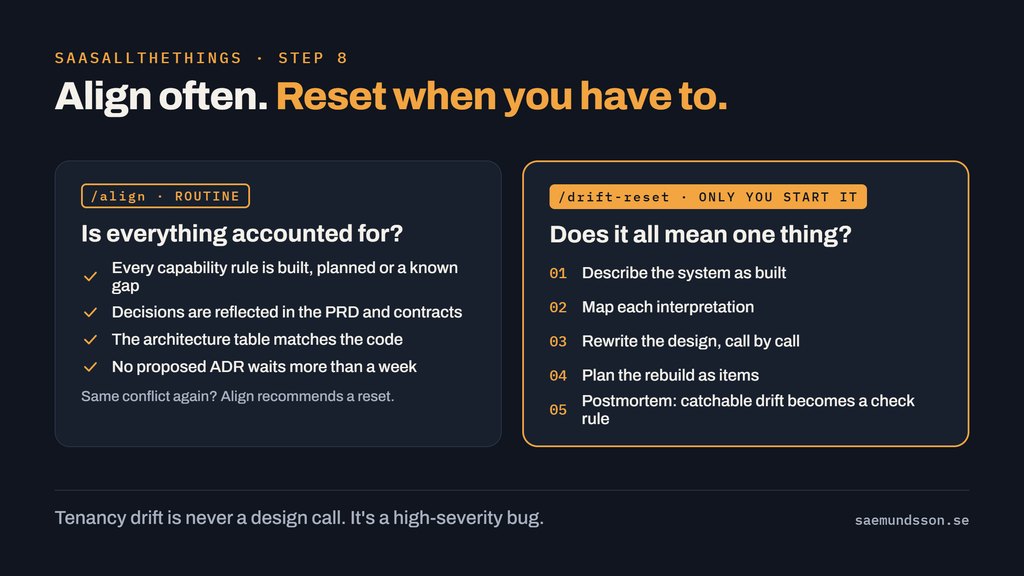
Align often. /align is a routine consistency pass across the PRD, decisions, ADRs, integration contracts, TASKS.md and the code. Every capability rule is built, planned or reported as a gap, every recent decision is reflected in the PRD, every project in the solution has a row in the architecture table, the architecture check passes and no proposed ADR has waited more than a week. Mechanical drift gets fixed; anything that touches the product or the architecture comes back to you. When the same conflict keeps returning, align recommends a reset.
Reset when you have to. /drift-reset is for when everything is accounted for, but a principle has been built two different ways. Only you can start it:
- Describe the system as built, area by area, with tenancy and identity always as an area of its own.
- Map how each pillar, PRD rule, contract rule and ADR was actually interpreted, and classify it as consistent, divergent or contradictory.
- Rewrite the design where it splits, one design call at a time.
- Plan the rebuild as ordinary items. No code is written in the reset itself.
- Run
/drift-reset postmortemafter the rebuild. Drift a script could have caught becomes a proposed check rule.
In SaaSAllTheThings a reset only covers the product you own. It never relaxes a check rule or touches the tenancy, identity and cost rules. Tenancy drift found in step 1 isn’t a design question at all: it’s a security finding, and it goes straight into the queue as a high-severity bug.
Try it
The fastest way to see what a project looks like is the worked example in the repository, [examples/order-desk](https://github.com/Freakling/SaaSAllTheThings/tree/main/examples/order-desk): a small order app with its PRD, decisions, ADRs, tasks and check settings in place. To watch the check work, clone the repository and run bash selftest.sh. It installs the framework into copies of the example and runs the architecture check, the hooks and the installer, with no Azure account needed.
Then pick your door:
- A new product: install the plugin, run
/saasallthethings:saas-all-the-things, and answer the product interview. - An existing app: run the
saas-assessmentskill first and read the report before you install anything. - Not ready for code yet: use
saas-design-sessionin the Claude app to work through the product and architecture decisions, or to prepare a workshop with your team.
SaaSAllTheThings is free and MIT licensed: github.com/Freakling/SaaSAllTheThings. If you try it on a real product, I’d like to hear how it goes, and I’m happy to walk your team through it.
You own the product. The framework owns the architecture. The agent builds. Trust the agent, and verify with the build.
In the docs
- SaaSAllTheThings: install, the check and every command
- /design: step 2
- /next-task: step 6
- Acceptance check: step 7
- /align and /drift-reset: step 8