Where Director-Driven Development sits among AI coding workflows
Director-Driven Development is a workflow, not an AI service. Where it sits on top of the tools, how it compares with other workflows, and why its standards are guidance you accept instead of something you have to bring yourself.
Rewritten on 5 November 2026 to match the vendors’ documentation and the frameworks as they stand today. First published on 21 October 2026.
I built Director-Driven Development because the second prompt kept going wrong: the fix after the demo, the feature on top of something that already worked. It is easy to line it up against Claude Code, Copilot or Devin as if it were one more product. It isn’t. It is a workflow, a way of working that runs on a coding agent, so the fair question is not whether it beats an AI service. The fair question is what a workflow adds on top of one, and how that compares with other workflows.
This comes from reading the vendors’ own documentation and best-practice guides, not from benchmarks, so it says what each one ships or prescribes, not how well it works.
The short version: no framework can make anyone build something secure, mine included. What Director-Driven Development does is bring the standards with it, so a developer accepts them instead of having to find them and bring them along, and it keeps the work in git, where it doesn’t depend on any vendor.
Where it sits
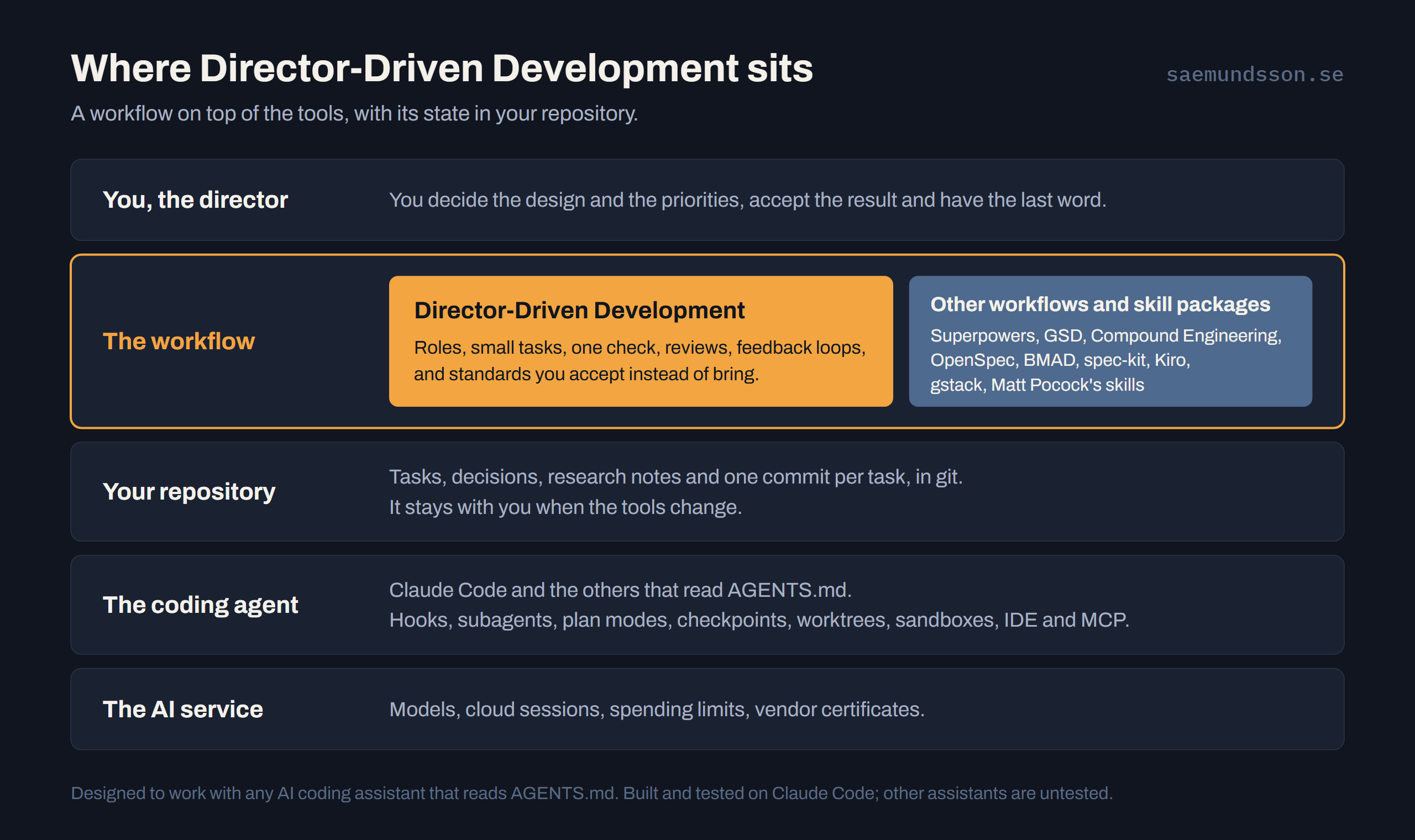
Three layers do three different jobs.
- The AI service supplies the models, the cloud sessions and the spending limits.
- The coding agent supplies the means: hooks, subagents, plan modes, checkpoints, worktrees, sandboxes, IDE integration and MCP servers. That is Claude Code, Cursor, Copilot, Codex, Gemini CLI, Aider, Cline or OpenHands at your side, or Devin, Jules and the cloud agents working on their own.
- The workflow decides how the work is done: who decides, how big a task is, what “done” means, what gets written down, and what happens when something fails.
DDD sits in that third layer, beside whole workflows such as Superpowers, GSD, Compound Engineering, OpenSpec, BMAD, spec-kit and Kiro’s specs, and skill collections such as Matt Pocock’s and gstack. There is good work in all of them, and I learned from reading them. DDD doesn’t compete with the layers below it; it uses them. A sandbox, a spending limit or an IDE plugin is something your tool gives you, and you keep it. The hooks that enforce DDD’s rules run in your coding agent. The frameworks are built and tested on Claude Code and designed to work with any assistant that reads AGENTS.md; other assistants are untested.
What the workflow produces lands in your repository, in git: tasks, decisions, research notes and one commit per task. That part is yours, and it stays when the tools change.
It isn’t tied to one kind of product either. Godot-Director is aimed at Godot games and SaaSAllTheThings at B2B SaaS on Azure, but App-Director’s workflow is universal: it works on anything you can keep in a git repository and check with a script. A web app, a Unity game, an Excel workbook and a PowerPoint deck all fit. It has ready-made check profiles for TypeScript, Flutter and Python; with anything else, the built-in checks still run and your own script adds the rest. DDD’s documentation site is built that way, as Markdown with no app stack at all.
What is common practice now
Most of the ideas I started from are mainstream, and that is good news.
- Verification as the core loop. Anthropic’s Claude Code guide tells you to give Claude a check to run; Devin’s guide asks for tests, linters and concrete pass conditions; Aider re-runs tests after every edit and tries to fix what fails. DDD’s check is the same idea with a fixed name and exit codes.
- Spec first, small tasks, fresh contexts. Osmani, Reed, Kiro, spec-kit and the Claude guide (have Claude interview you, write SPEC.md, “start a fresh session”) all say it. DDD’s one-item-one-context is the same move.
- Instruction files. AGENTS.md is read by Cursor, Codex, Jules and Copilot, so my choice of it is no longer a choice.
- Review in a fresh context. The Claude guide recommends a read-only reviewer subagent that hasn’t seen how the code was written, which is DDD’s review rule in other words.
- Hooks for guarantees. The same guide draws the line I draw: an instruction carries no guarantee, while hooks and deny rules are deterministic.
If you are doing those five things with any tool, you are most of the way to this way of working already.
Standards you accept instead of bring
The person who owns a product can always decline a finding, skip a hook or edit a check, and that is how it should be. What a workflow can change is the default. Without one, you have to know which standards apply, find them and bring them to your agent. With one, they are already in the repository, and your job is to accept them, or to say on the record why not. That holds in three areas.
- Security. App-Director and SaaSAllTheThings carry the OWASP Top 10, and the OWASP API Security Top 10 for anything that serves an API, as a baseline. Design options state their effect on it, reviews read each change against it, and a security assessment checks what is built before a release and whenever you ask. A deviation is a decision you accept, naming the item and why.
- Delivery. SaaSAllTheThings defaults to dev and prod environments, production from a tag behind an approval, a what-if before every deploy and a smoke test after it, and offers a workflow template that runs the check on every pull request and keeps its output. Godot-Director has a GitHub Actions template that exports on every change and holds production for your approval. App-Director’s security checklist asks for committed lock files and builds that install from them. The aim is builds and deploys that repeat, and you choose how much of it to install.
- Compliance. SaaSAllTheThings asks which security framework and regulations apply to your product, with choices such as ISO/IEC 27001, NIST CSF, the ISF Standard of Good Practice, GDPR, NIS2, DORA, SOC 2, PCI DSS and HIPAA, and records the answers in the requirements. The repository has a place for your standard, with the OWASP baseline already in it: a mapping table that ties each control to the rule, decision or test that meets it. The controls of the standard you pick come from you or from a document you provide. That doesn’t make an app compliant: naming a framework marks nothing met, and an auditor and the running system decide that. It does mean the technical work lines up with the standard from day one.
Where a rule can be read from the code, the framework goes further than guidance and the check fails the build. App-Director’s fails on credentials in source and on UI code that reaches the data layer. Godot-Director’s fails when a screen rolls dice or writes game state. SaaSAllTheThings has ten rules, from tenant isolation to public network access in the infrastructure code. Everything else is guidance you accept, because a check can read a file, and only a person can decide what a product needs.
Who brings it
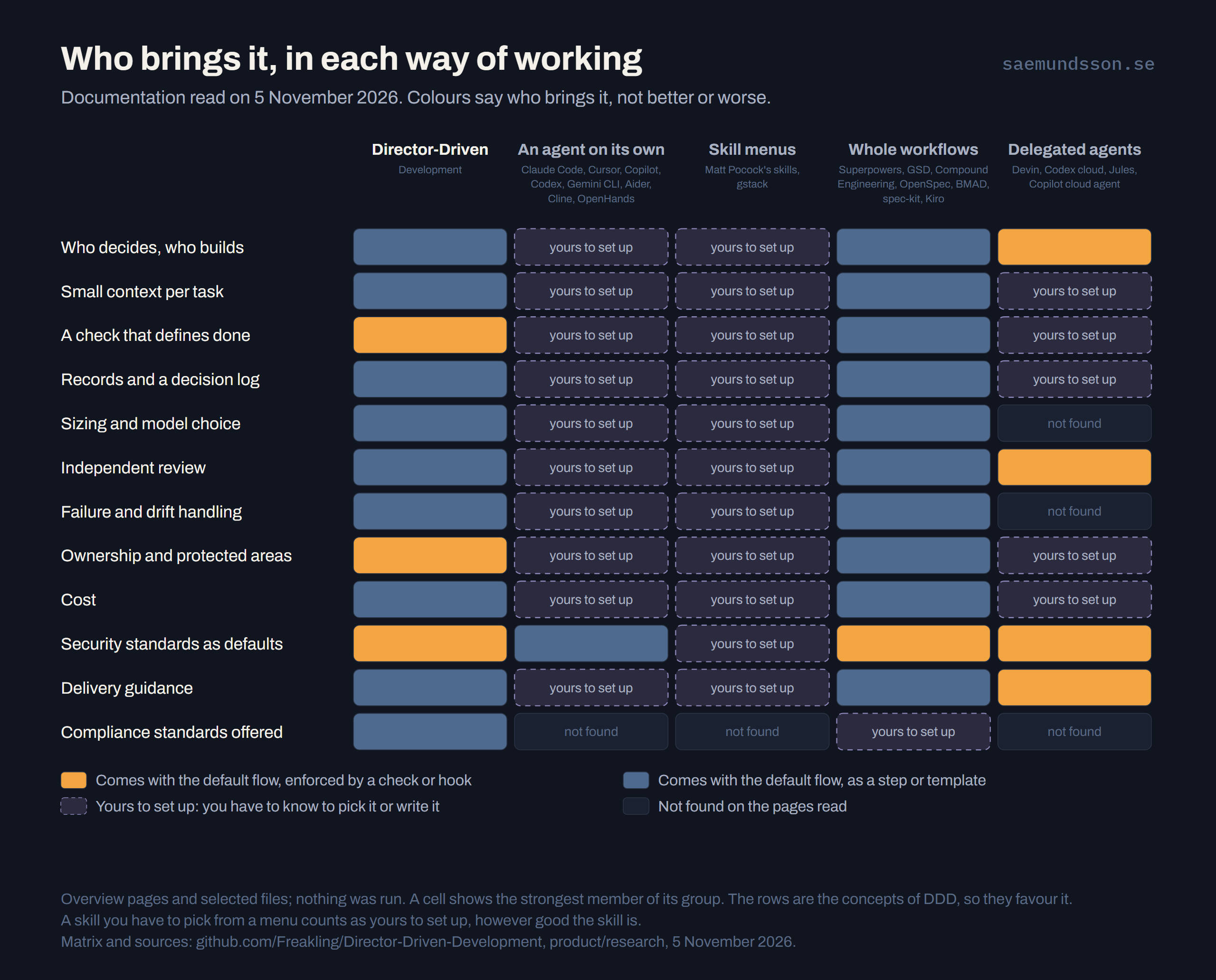
Line the ways of working up and the useful question for each row is who brings it: does the default flow take you there, or do you have to know to ask?
- An agent on its own gives you the means, and they are good ones. You can write a hook that holds a turn open until the tests pass, or deny rules that protect a folder. The vendor’s guide tells you how, if you go and read it.
- Skill menus hand you excellent pieces to choose from. gstack’s
/csoaudit covers the OWASP Top 10, and Matt Pocock’sretroturns a failed session into a proposed check. They count as yours to set up here because you have to know to reach for them, however good they are. - Whole workflows take you through the steps. Superpowers picks a model per role and caps a stuck fix at five rounds, Compound Engineering’s
/ce-compoundwrites down what it learned for the next plan, and GSD has a security gate that is on by default. - Delegated agents ship gates of their own. GitHub’s Copilot cloud agent runs CodeQL, secret scanning and dependency checks unless you switch them off, and cannot approve or merge its own pull request.
DDD belongs with the whole workflows, and that column is its nearest neighbour. On the pages I read, none of the others asks which regulation applies to your product. BMAD, OpenSpec and spec-kit do have a place to write your own requirements, as a text field you fill yourself.
Where it stands out, as far as I could find
Reading overview pages and selected files, not everything, these were not found in any of the tools or packages above:
- A decision log tied to dated research notes, each with its sources, confidence and a “verified as of” date, so a later session reuses the evidence instead of redoing it.
- A named drift reset that only the director can start, beside a routine alignment pass over the records and the code. Kiro and spec-kit check a spec’s internal consistency, which is narrower.
- An ownership table with placeholders for what the human owns, backed by a hook that blocks the agent from the director’s own workspace.
- Architecture rules inside the build check, with an accepted decision record as the only way past them, in SaaSAllTheThings. The Claude guide tells you to write such hooks yourself; spec-kit’s gates are checklist items, and a failed gate needs a written justification.
- Questions about which security framework and regulations apply, with a mapping table seeded with the OWASP baseline, also in SaaSAllTheThings.
The honest qualifier: “not found” on the pages I read, and this field moves fast.
Where other workflows differ
Much of what these packages do, DDD does too in its own form. gstack’s /qa opens a real browser, and DDD has screen capture, playtesting and acceptance checks for the same job. Two differences are worth naming.
- Spec depth: Kiro has wave-based parallel tasks and property-based tests, spec-kit has presets and extensions, and BMAD has multiple-agent discussions. DDD’s specs are simpler: a brief, user stories and a task list.
- Parallel by default: GSD runs plans in parallel waves, each with a fresh context. DDD runs one task at a time by default, because one task and one commit keep the history clean, and it can run tasks in parallel when they don’t touch the same systems or files.
Rewind, and what DDD does instead
Checkpoints belong to the agent layer. Claude Code and Cline restore the conversation and the files the agent edited, and if your tool has them, you keep them. DDD’s own way back is built on git rather than on a service. Every decision and every finished task is a commit, so the way back is in the history. It is done with git, not by the AI, and anything that discards work or rewrites history needs a person. That history is portable, and it doesn’t depend on any vendor’s AI service.
The bigger difference is what comes after. Going back and prompting again hopes that the next answer will solve what the first did not, and a model’s answer isn’t deterministic. DDD puts feedback loops there instead. A problem becomes an item with outcomes that prove the fix, and a fixed bug gets a regression test when it can have one. Two failed attempts stop the build and come to you. A drift reset goes further: it writes down how the app was built, what went wrong and what would have shown it earlier, and its postmortem proposes a check rule for each drift a script could catch next time. What failed stays on record as a known bad state, which is how you avoid making the same mistake twice.
What a workflow adds
No framework can guarantee stability or compliance, and no AI service does either; several vendors say in writing that reviewing the output is your job. DDD is only a tool too. What it can do is build in the loops that help you on that journey.
Many services can now turn a prompt into a zip file or an APK that runs on your machine. Getting from there to a real running app takes knowledge most people don’t have: tests, secrets, releases, security, and what to do when something breaks. DDD aims to bridge that gap. You can start from a brainstorm or a mockup, describe the product in your own words, and be guided through the decisions as options with a recommendation, so that anyone with an idea can build an app without ten years in the industry. The best workflows here guide you well through planning and building, and GSD goes on to security and release. DDD aims to cover the whole way, ownership included.
That is the value I see:
- Standards arrive as defaults. You start from a security baseline, delivery guidance and a place for your own security framework, not from a blank prompt.
- Failure feeds the next round. A problem becomes an item, a check or a recorded decision, so the project gets better at catching its own mistakes.
- The work stays yours. Decisions, research and history sit in git, readable by anyone who reviews them and independent of any vendor.
People still own compliance: a customer’s control framework and its auditor decide what evidence counts. What the loops give them is technical work lined up with the standard, and records they can read.
Independent evidence says the gates are worth having. Veracode found security flaws in 45 percent of its tests of AI-generated code, with newer and larger models no better. CodeRabbit counted 1.7 times the issues per AI co-authored pull request, and up to 2.74 times the security issues, in 470 pull requests with authorship inferred. DORA associates a 25 percent rise in AI adoption with 7 percent less delivery stability. A preprint on 4,022 agent pull requests found a security smell in 39 percent, and that human review missed 81 percent of the hard-coded credentials among them. Review alone does not catch this; a deterministic check does, which is why the rules that can be checked go in the check, and why the rest should be there from the start.
So here is the line I stand behind: AI tools generate and review; Director-Driven Development brings industry standards as guidance you accept, makes the rules it can check part of done, and leaves records a reviewer can read.
Now I would like to see it tested by more people than me. The documentation shows how to start with any of the three frameworks. Build something with it, and tell me what worked and what didn’t, as an issue on GitHub or on LinkedIn. And if you take an app built with DDD to production, I would love to interview you about it.
Sources
Vendor documentation, read 5 November 2026: Anthropic, Best practices for Claude Code, Claude Code security, agent teams and GitHub Actions; GitHub, about the Copilot cloud agent, its risks and mitigations and repository instructions; GitHub spec-kit and its spec-driven.md; Kiro specs and hooks; BMAD method; Cursor rules and Bugbot; OpenAI Codex, AGENTS.md and security; Jules; Devin, instructing Devin and Devin Review; Cline, plan and act; Aider, lint and test; Gemini CLI; OpenHands.
Skill and workflow packages, read 5 November 2026: Superpowers; GSD; Compound Engineering; OpenSpec; BMAD documentation; Matt Pocock’s skills; gstack.
Practitioner methods: Addy Osmani, my AI coding workflow; Harper Reed, my LLM codegen workflow.
Evidence on AI-generated code: Veracode, GenAI Code Security Report 2025; CodeRabbit, State of AI vs human code; DORA, the impact of generative AI in software development; security smells in agent pull requests, arXiv 2607.12428.
The frameworks, read at their latest releases on 5 November 2026: App-Director v1.14.1, Godot-Director v4.10.1 and SaaSAllTheThings v0.16.1.
The research notes behind this post, with the full comparison matrix and the gaps in what was read, are in the Director-Driven Development repository: the tools, the skill and workflow packages and production readiness.